Releases
Call My Agent: talk to Codex, Claude Code, pi and OpenCode
Call the Codex, Claude Code, pi or OpenCode agent running on your machine, straight from TermRover. Talk through your codebase by voice on a walk, a ride or a road trip.
TermRover can now call the coding agent you already have running. Any Codex, Claude Code, pi or OpenCode agent in a tmux or Herdr pane can take a call: open its terminal tab, tap Call agent, and start talking. The agent keeps working in the same session you would type into, and answers you out loud.
What you need
The first time you call on a machine, TermRover shows you what the call needs before it sets anything up. Nothing is installed until you tap Accept and Continue.
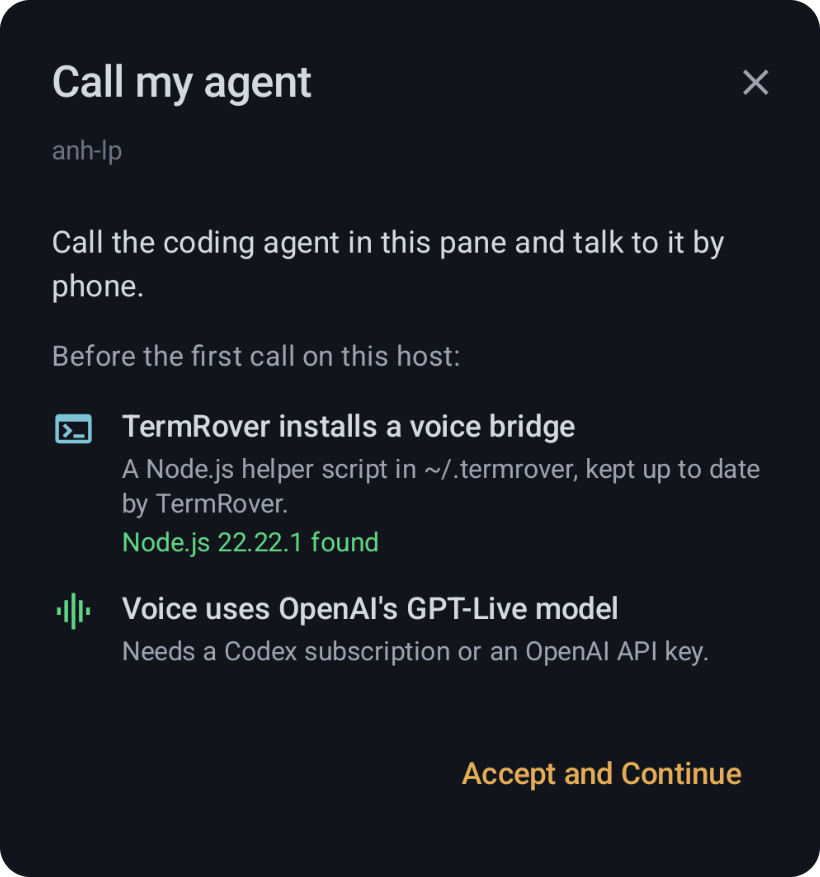
- Node.js 18 or newer on your machine. TermRover installs a voice bridge, a small Node.js helper script in
~/.termrover, and keeps it up to date for you. The dialog shows the Node.js version it found, or tells you what is missing. - A Codex subscription or an OpenAI API key. The voice is OpenAI’s GPT-Live model. With an API key, OpenAI bills you $0.05 a minute.
You also need:
- A macOS or Linux machine you reach over SSH. Mosh tabs work too. Windows machines can’t be called.
- Your agent running in a tmux or Herdr pane. Zellij panes can’t be called.
- iOS 17.4 or later on iPhone and iPad.
- TermRover Pro for unlimited calls. Without Pro, you get one free call a day.
Codex and Claude Code need nothing else. pi and OpenCode need a small TermRover extension or plugin, which TermRover installs only when you tap Install.
4 supported agents, for now
Tap the host name at the top of a terminal tab and choose Call agent, next to Browse files. TermRover looks at the pane you are on and offers Call Codex, Call Claude, Call pi or Call OpenCode, whichever is running there. If the pane is sitting at a shell prompt, Start & call starts the agent for you, then calls it.
You can also call from the Herdr Agents Fleet, where every agent TermRover can reach has its own call button.
| Agent | What TermRover adds on your machine |
|---|---|
 Codex Codex |
Nothing |
 Claude Code Claude Code |
Nothing |
 pi pi |
A small TermRover extension |
 OpenCode OpenCode |
A small TermRover plugin |
More agents are coming.
A real conversation with your codebase
The voice on the call is OpenAI’s GPT-Live. It is full duplex, so it feels like talking to a person: you can talk over it and interrupt it at any time, and it keeps up.
Everything you ask goes to your agent. Your requests arrive in the agent’s conversation as ordinary messages, the agent does the work against your codebase, and you hear the answer. Watch the pane and you will see each request land.
That makes a call good for the things that are easier to say than type:
- Check on progress. “How is the refactor going? Do the tests pass yet?”
- Discuss a feature. Talk through what you want, hear what the agent would change, and decide together.
- Brainstorm. Think out loud, let the agent poke holes in the idea, then ask it to write the plan down.
A question asked while the agent is busy steers the work in progress, the same as typing it would. Anything you say after your last request is passed on when you hang up.
Show it a screenshot
Words are not always enough. While the call is going, tap Attach and send a photo, a screenshot or a file. It lands on your machine and goes straight to the agent, so you can say “this is what I’m seeing” and keep talking.
Keep working while you talk
Minimize the call and you are back in your terminal, watching the agent work as you talk to it. A glowing phone button stays on screen, so you always know the call is live and can jump back in one tap.
A real phone call
Lock your phone and the call keeps going, like any other phone call. On Android it goes through the system’s call handling, so your lock screen and your Bluetooth headphones treat it as a call. On iPhone and iPad it uses Apple’s calling system. If your connection drops, the call reconnects to the agent where it left off.
Take your agent for a walk
This is where calling your agent really shines. Put your headphones in, put the phone in your pocket, and keep going:
- Walking to work. Plan the day’s feature with your agent and let it get started before you arrive.
- On a bike ride. Check on a long task and decide what comes next, without stopping.
- On a road trip. Talk through an idea with the agent hands-free while you travel.
It is a voice conversation, so your eyes and hands stay where they belong.
Coming soon: Android Auto and Apple CarPlay
The car is next. Android Auto and Apple CarPlay support is in the works, so you will be able to call your agent from the car’s own screen. It is not part of this release; I will write about it when it ships.
Probably coming: Dessa
Block has just announced Dessa, a full-duplex speech-to-speech model that runs locally on a MacBook Pro M4 Max or better. It is waitlist-only for now. Support for Dessa is probably coming, as a voice option next to GPT-Live.
Privacy
TermRover does not add an AI of its own. The voice runs on OpenAI under your Codex subscription or your API key, and the work is done by the agent you were already running.
OpenAI processes the call audio and the conversation’s context. An API key stays encrypted on your phone and is never saved on your machine. Your requests reach the agent through its own interface, not as keystrokes in your terminal.
Try it
Open a terminal tab where your agent is running, tap the host name, then Call agent. Pick a voice in Settings if you like, and say hello to your agent.